-
AI FactoryAI FactoryAI Factory – already hereThe AI Factory is no longer a concept — it’s a reality.

-
NeoCloudNeoCloudAI Factory – already hereThe AI Factory is no longer a concept — it’s a reality.
-
SolutionsSolutions
-
CompanyCompany


Building a Secure AI Coding Assistant with Roo Code, Kilo Code on VSCode
By integrating AI into coding workflows, developers can significantly enhance their productivity and efficiency, streamlining the development process from building to debugging. However, relying on third-party SaaS models can raise serious concerns about data privacy and security. That’s where Roo and Kilo come in – empowering developers to build AI-powered coding assistants that prioritize data sovereignty, with fully self-hosted, customizable, and sovereign infrastructure.
In this tutorial, we will guide you through the process of building a sovereign AI coding assistant that respects data sovereignty, enabling fully self-hosted, sovereign, and customizable infrastructure. By the end of this blog, you will have a deep understanding of how to leverage Roo and Kilo to create a powerful AI coding assistant that meets your organization’s specific needs while maintaining control over your data.
Why Sovereign, Self‑Hosted Assistants Matter
Tools like Cursor, Copilot, Claude Code and Gemini offer powerful out-of-the-box features, seamless integrations, and vendor-managed updates. They operate within robust compliance frameworks and often have conveniences such as fast adoption, advanced coding quality, or cost-effective access.
However, they inherently involve sending your code, prompts, and context to these external services – even if encrypted. This exposes IP and code structure to third-party systems, which can cause privacy issues and IP code leakage, many of which these services use (i.e. hosted on Azure, AWS or GCP clouds). In contrast, Roo or Kilo can operate entirely within your preferred choice of (cloud-hosted AI) infrastructure provider. This eliminates data leakage risks, ensures auditability, supports fine-grained access control, and aligns with GDPR and European regulatory frameworks – especially when paired with sovereign infrastructure like Nebul’s NeoCloud for high availability, speed and privacy.
Roo and Kilo Advantages
Roo Code offers powerful AI assistance: file reads/writes, terminal operations, browser actions, custom modes like Architect, Code, Ask, Debug, and integration via MCP for extensions.
Kilo Code adds accessibility, context management, and merged improvements from Cline and Roo. It features the MCP marketplace, multi-mode workflows, hallucination mitigation, and seamless integration with modern models, all while remaining open-source, self-hosted and highly customizable for any team and workflow.
Community voices support these choices:
“… the only ones I recommend are cline/roo code… roo code is a fork of cline with more features”
Privacy and Security
Academic research highlights that many VSCode extensions can unintentionally expose credentials or sensitive input across extension boundaries Roo and Kilo, being open-source and self-hosted, give teams control over dependencies and configuration, reducing this risk surface.
Other research emphasizes that public coding assistants can expose proprietary code inadvertently. Using Roo/Kilo with an internal model or via Nebul’s Private Inference API removes that exposure entirely.
Sovereignty and Compliance
With Nebul’s Private Inference API, teams can deploy models via API under EU jurisdiction, maintaining full alignment with GDPR, EU AI Act, and local sovereignty requirements. This approach offers full control over compute infrastructure, audit logs, and regulatory compliance, especially compared to SaaS models like Claude or Gemini – even those offering privacy guarantees.
Trade-offs Versus SaaS Assistants
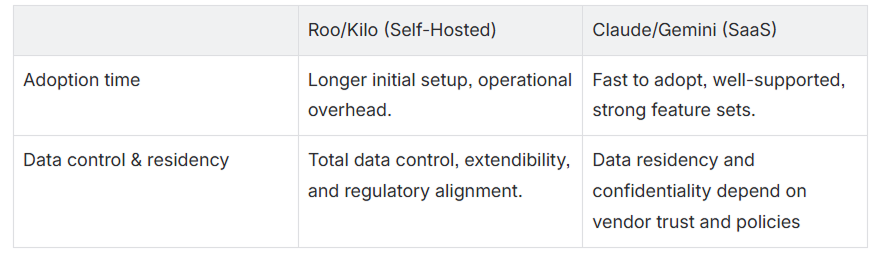
A hybrid model is possible: use Claude or Gemini for low-risk workflows while reserving Roo/Kilo for sensitive IP, privacy-critical projects, or domains where sovereignty is required.
Setting it up
Setting it all up takes slightly longer, but you can follow this tutorial to get it up and running within a matter of minutes rather than days.
-
Roo Code: https://github.com/RooCodeInc/Roo-Code
-
Kilo Code: https://github.com/Kilo-Org/kilocode
-
VSCode: https://code.visualstudio.com/
-
An API key to any model – We use Devstral as an example, there are multiple options available. Roo and Kilo can be configured with any language model served through a compatible API. Models vary in context size, inference speed, and capabilities. Choose based on internal requirements. You are not limited to any specific vendor or architecture.
Setting Up Roo or Kilo with Nebul’s Private Inference API
-
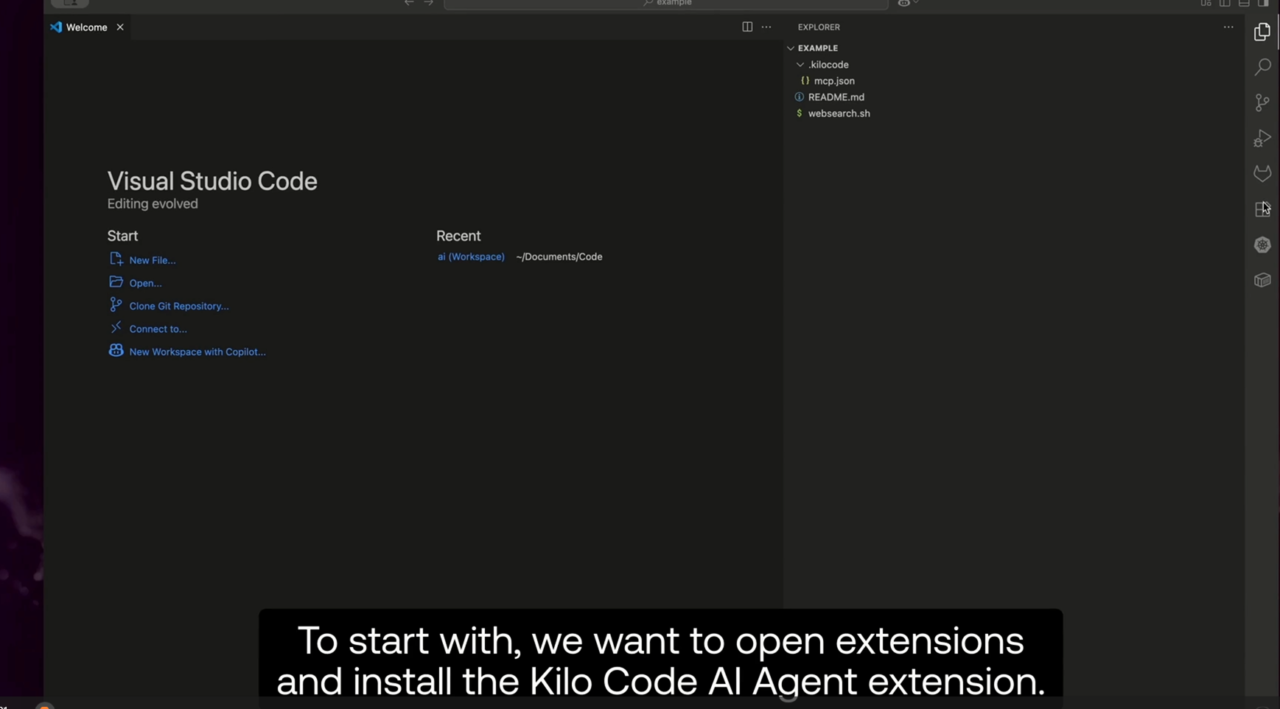
Install the extension via VSCode Marketplace Search for “Kilo Code” or “Roo Code” in the Extensions panel and install. Alternatively:
-
Kilo: marketplace.visualstudio.com/items?itemName=kilocode.kilo-code
-
Roo: marketplace.visualstudio.com/items?itemName=RooVeterinaryInc.roo-cline
-
The process for both tools is the same, as Kilo is a fork of Roo with some customization added in.
-
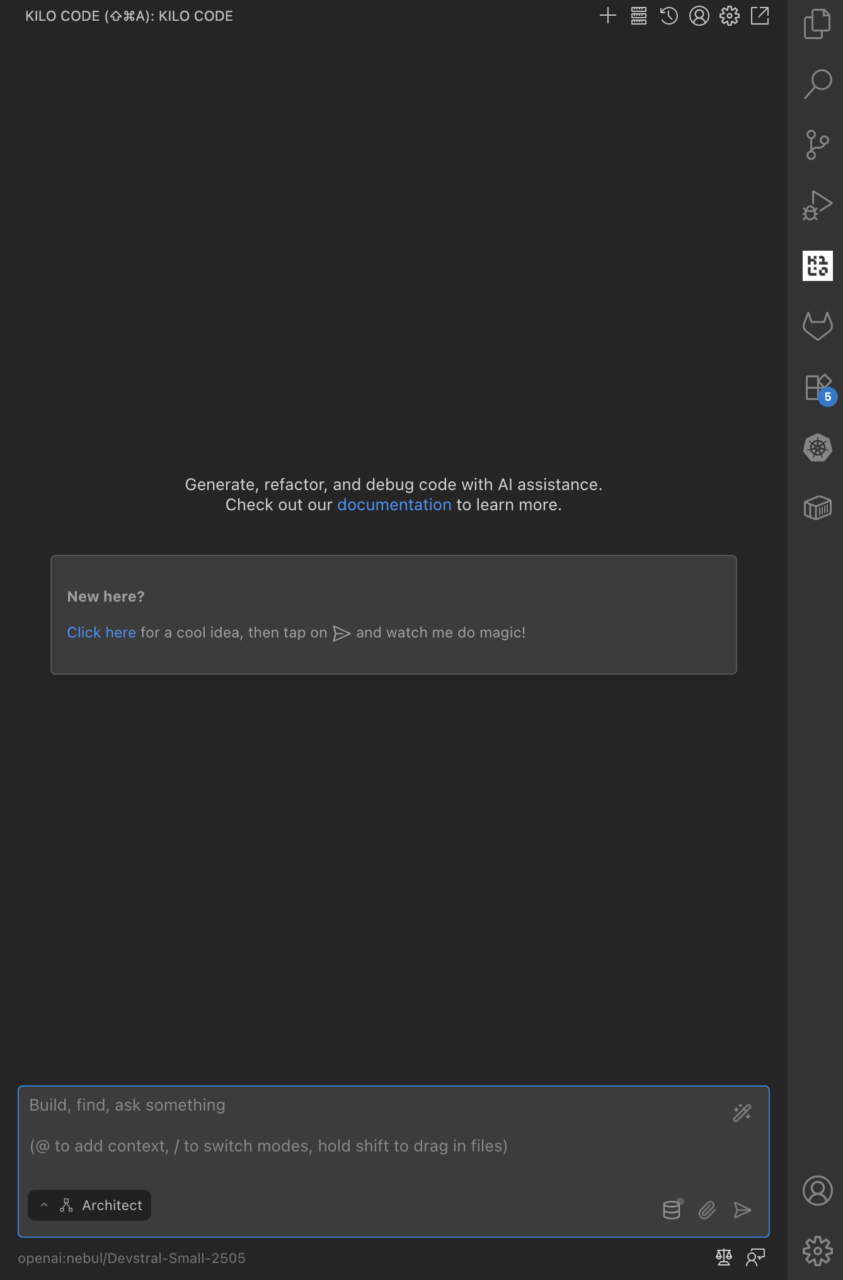
Kilo Code Panel
2. Open Extension Settings and configure:
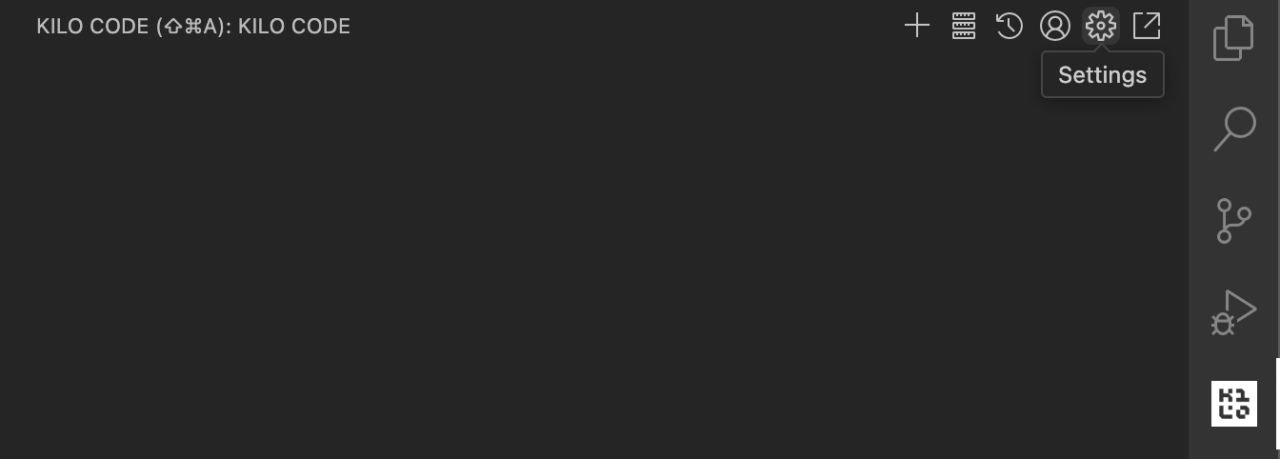
Open Extension Settings and configure:
Settings can also be adjusted via the Settings interface
-
ai.backend.api_key: your internal API key -
ai.backend.api_base: the URL of your model API (openAI-compatible) -
ai.backend.model: any available model, e.g., mistralai/devstral-small-2507 -
ai.backend.streaming: false (recommended for model stability, but not necessary) -
ai.context.max_tokens: set based on the model’s context window, e.g., 128000
Make sure to save your settings!
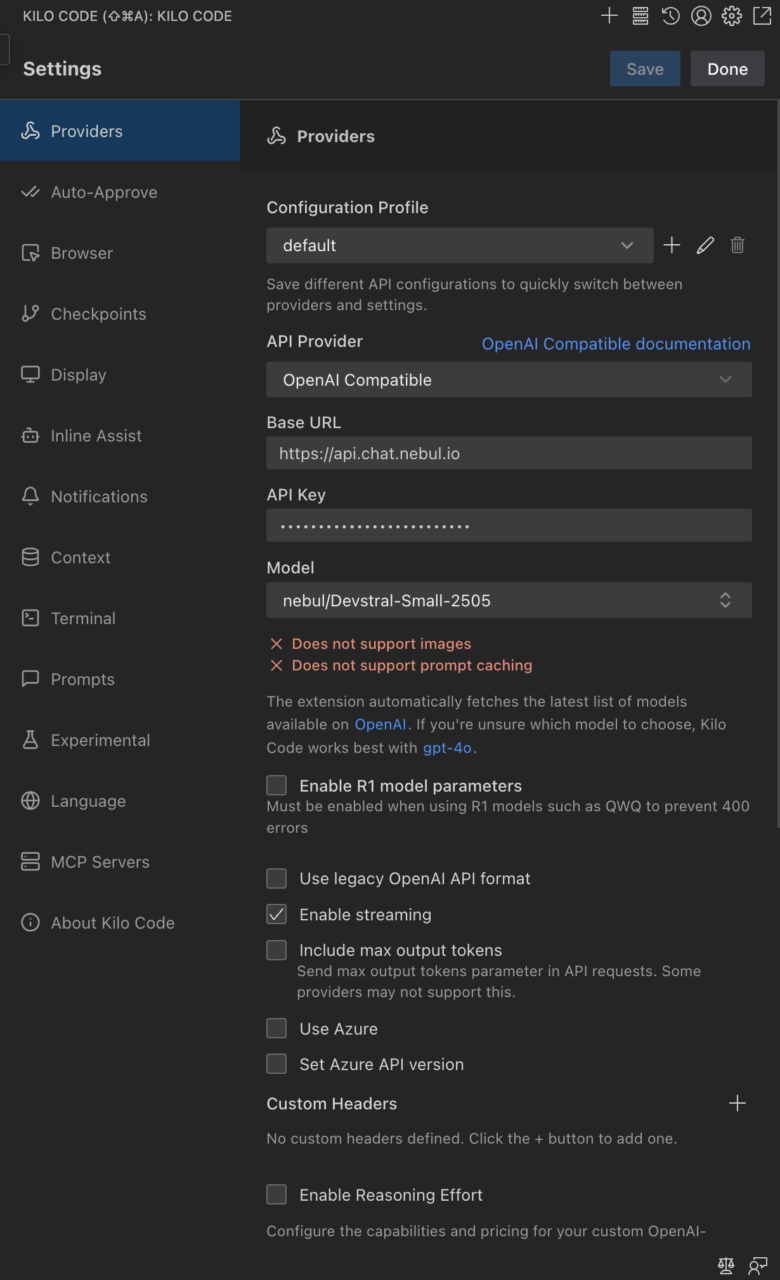
Opening the settings panel immediate allows you to configure the model on the presented page (scrollable). Nebul offers various models using OpenAI-compatible endpoints (standard API schema), some of which can also utilize reasoning and reasoning effort, multimodal support and prompt caching for advanced workflows.
3. Enable advanced code features:
-
codebase.concurrent_edits: true-
In the interface, these are available in the experimental section:
-
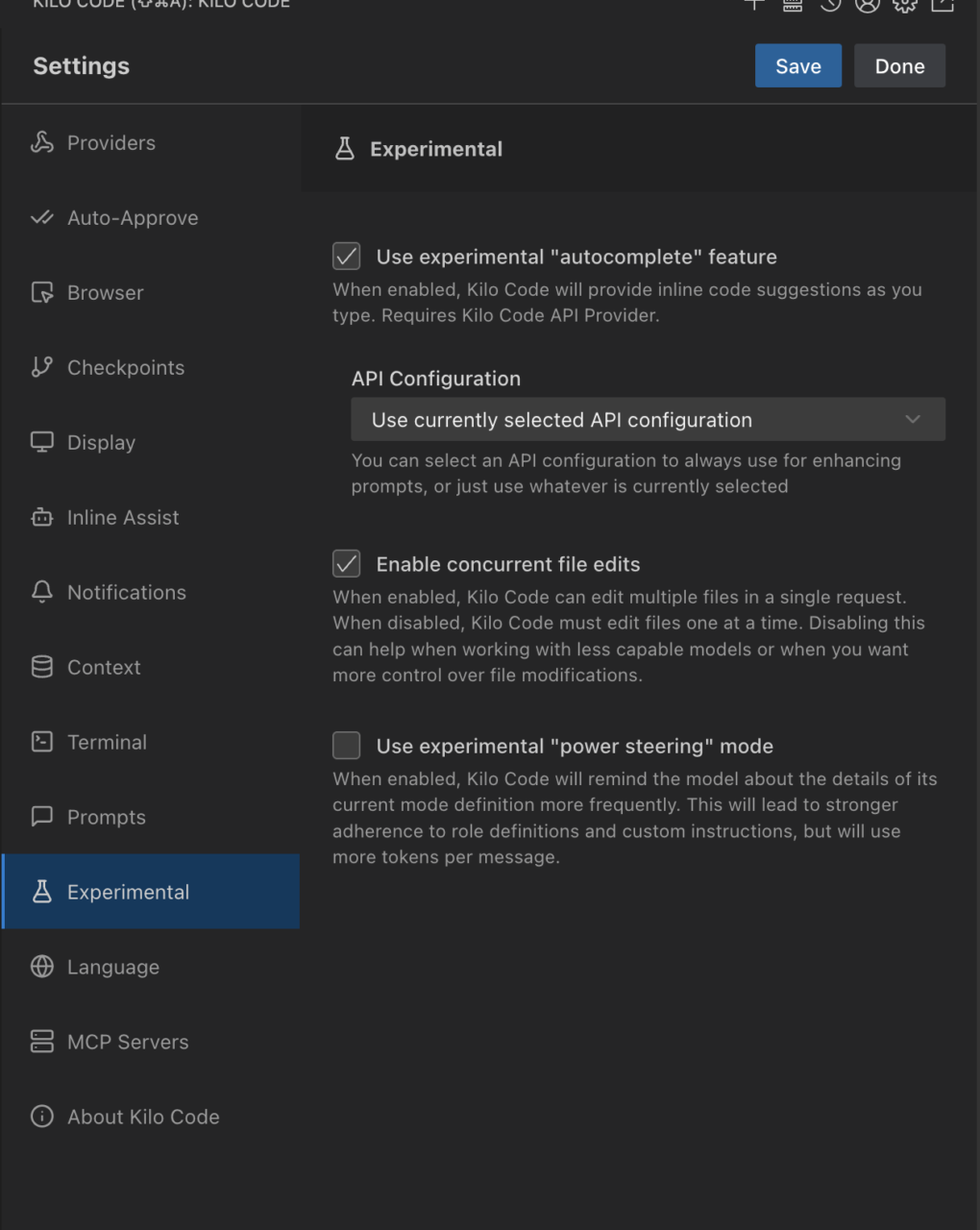
4. Configure QDrant for semantic codebase indexing, enabling faster coding workflows:
-
codebase.indexing.provider: qdrant -
codebase.indexing.qdrant_url: your QDrant instance URL -
codebase.indexing.qdrant_api_key: your QDrant API key
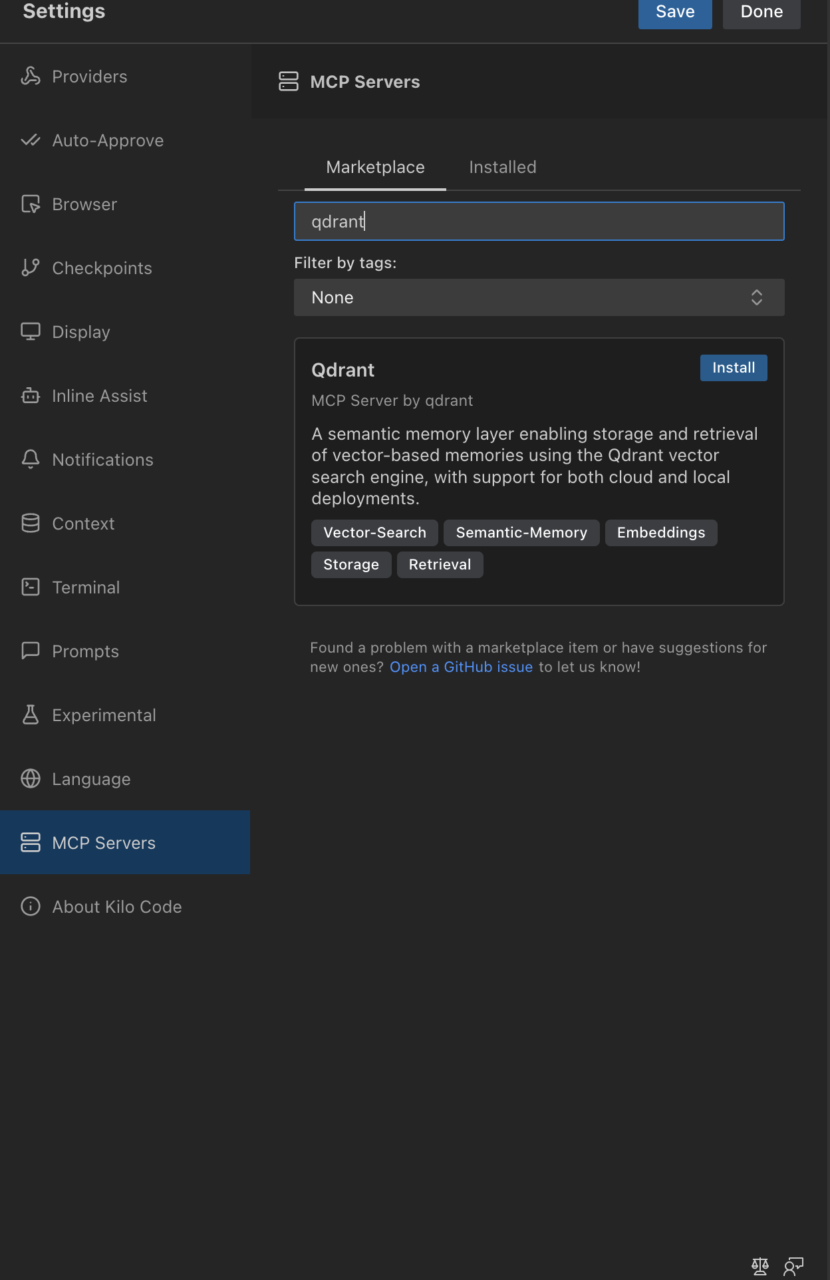
In recent versions, this is usually offered via MCP servers.
- Teams can share a central QDrant instance to improve efficiency and enable shared context, which is another possibility with Nebul’s NeoCloud.
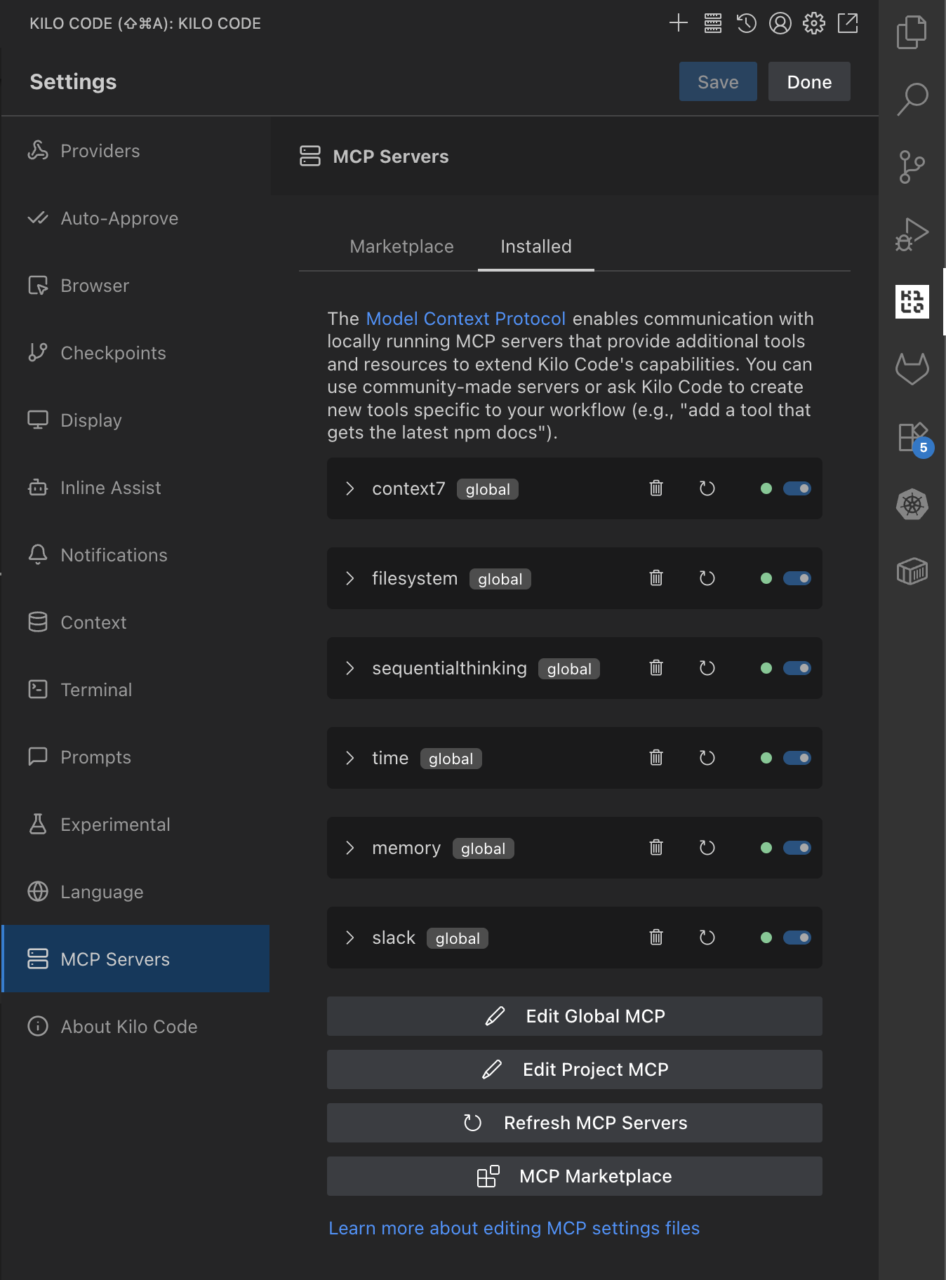
5. Install (other) useful MCP servers through the internal marketplace:
-
-
Context7 for extended memory
-
FileSystem for direct file access
-
GitContext for Git-aware semantic search
-
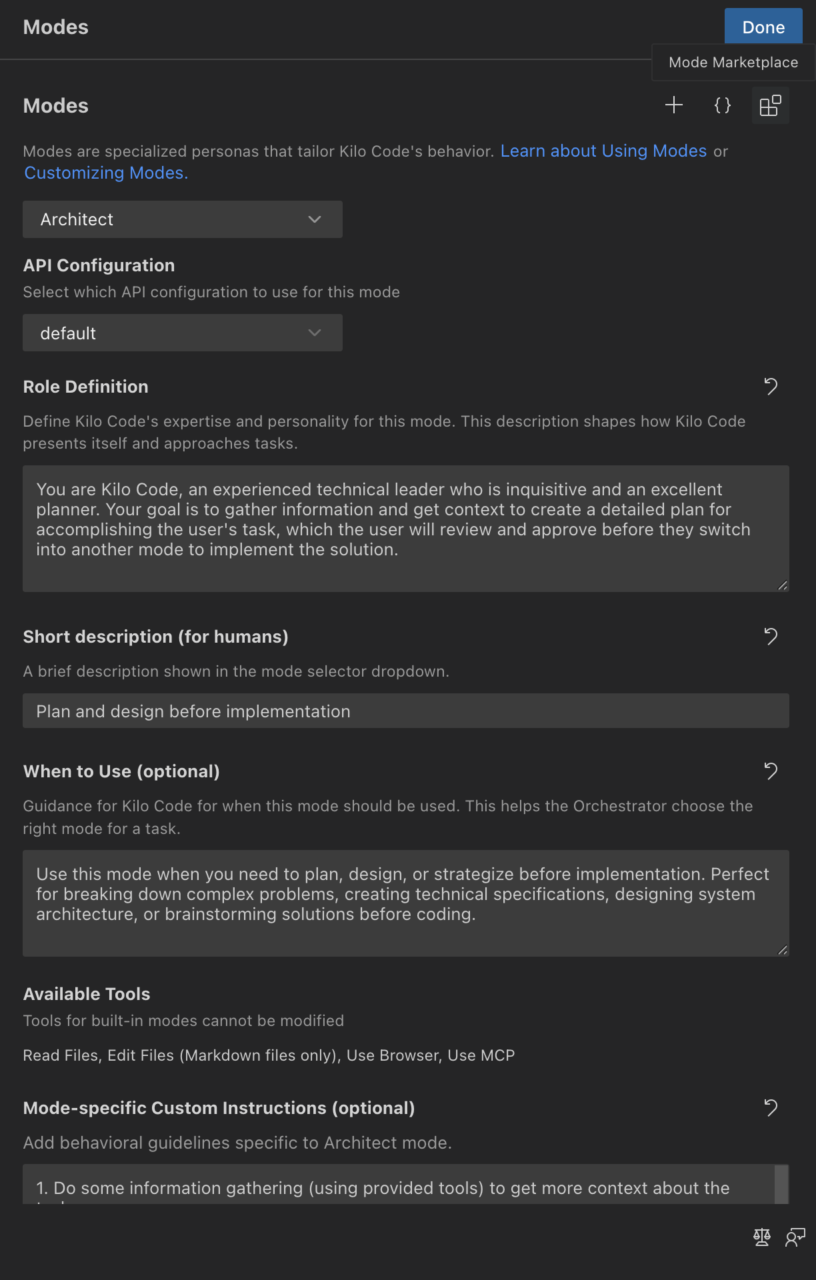
6. Use interaction modes to organize tasks:
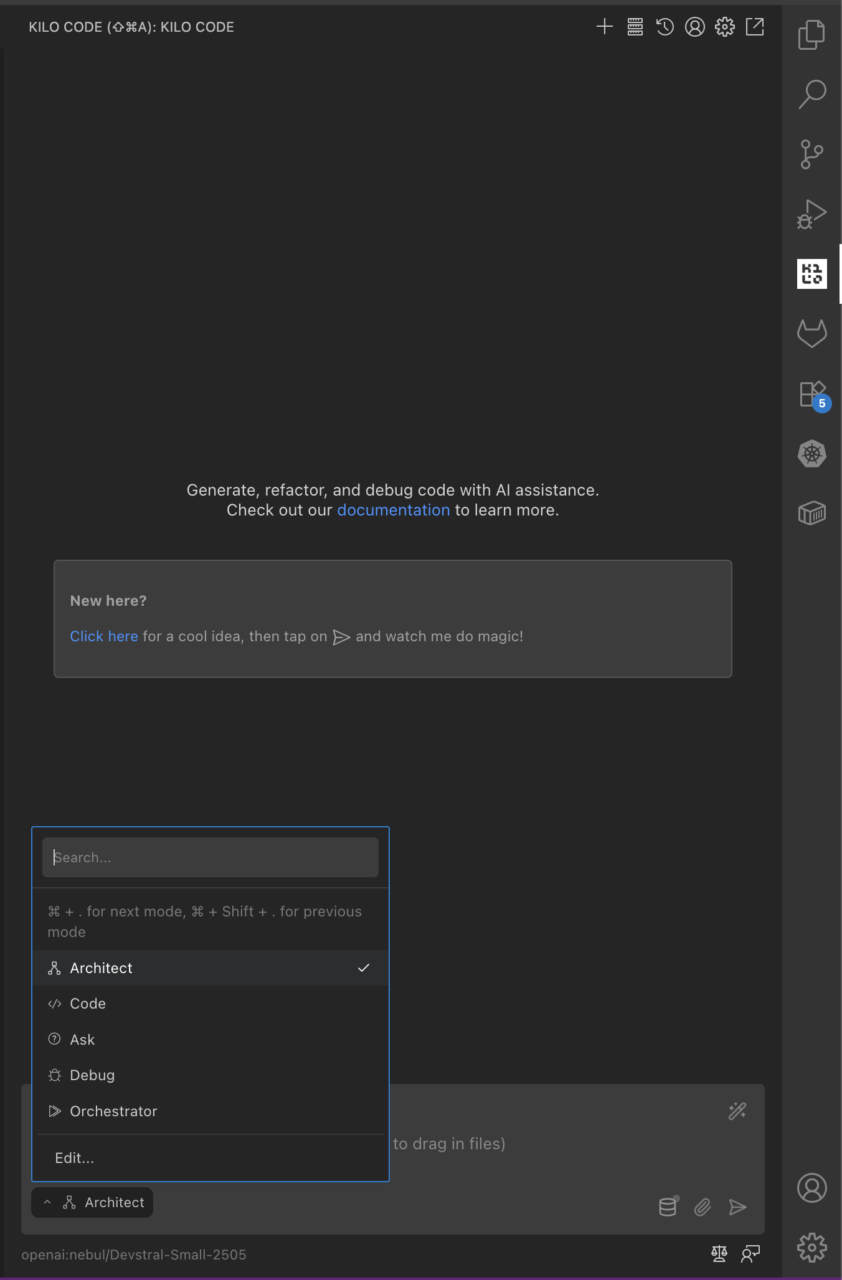
Use interaction modes to organize tasks
-
Architect for planning
-
Code for implementation (best for simple, well-described features)
-
User Story Creator for task synthesis
-
Orchestrator for automatic switching between different modes
-
Custom modes for different purposes, such as infrastructure/devops, codebase-specific modes, or even different modes with access to different tools and MCP servers
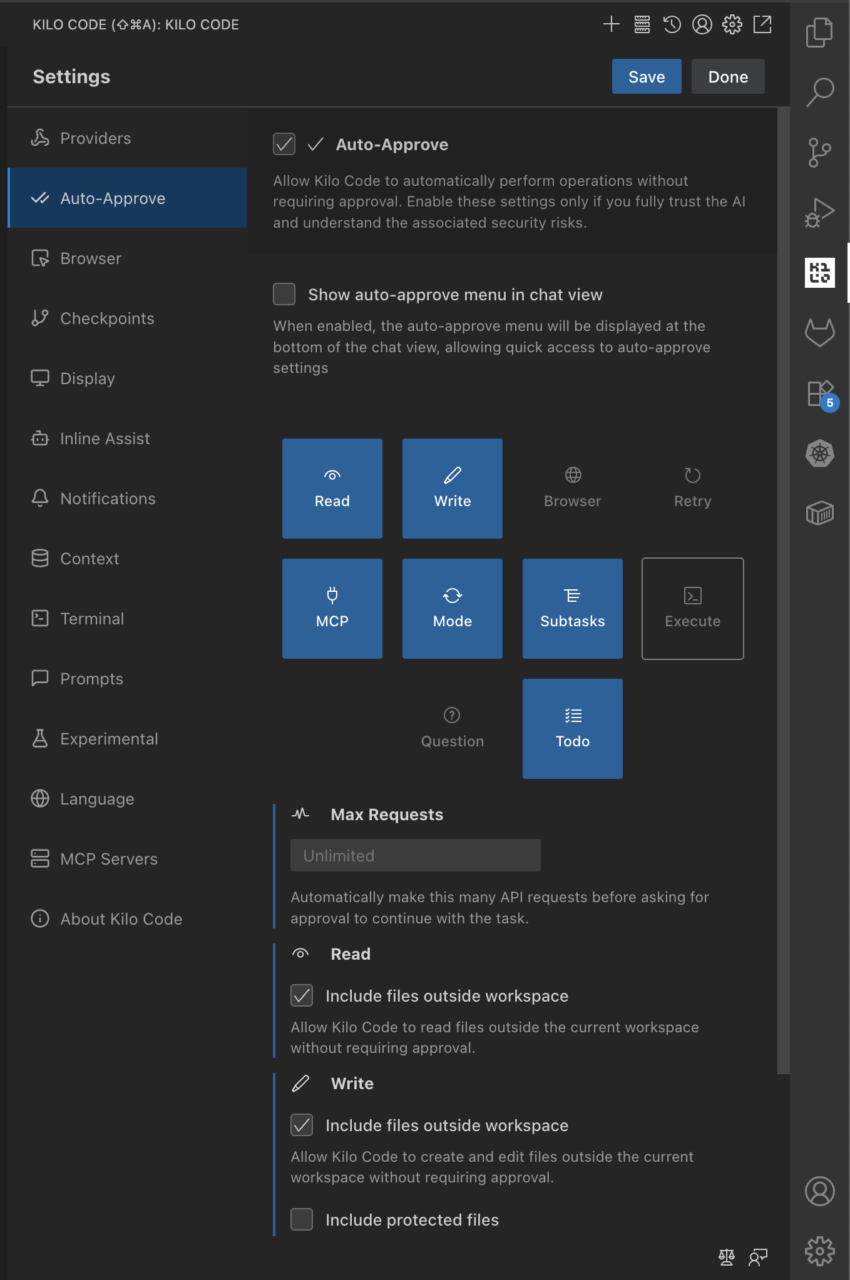
7. Optionally enable auto-approve:
-
ai.agent.auto_approve: true
This allows the assistant to make changes without manual approval. Primarily recommended in sandboxed environments.
8. Configure some other MCP server as a private search provider:
-
GitHub – Aas-ee/open-webSearch: Web search mcp using free multi-engine search (NO API KEYS REQUIRED) — Supports Bing, Baidu, DuckDuckGo, Brave, Exa, Github, Juejin and CSDN. – example of an open-source search provider project
-
GitHub – benbusby/whoogle-search: A self-hosted, ad-free, privacy-respecting metasearch engine – requires more setup, but is more well-maintained
-
Follow the instructions above to host as a docker service locally or, if preferred, contact Nebul about the NeoCloud offering to host these containers on a private cloud.
-
After running the docker container, configure this in your
kilocode.kilo-code/settings/mcp_settings.jsonfile (accessible via theEdit Global MCPin the MCP Servers Settings panel in Kilo Code):
{
"mcpServers":{
"openwebsearch": {
"type": "streamable-http",
"url": "http://localhost:3421/mcp",
"alwaysAllow": [],
"disabled": false
}
}
}
Sovereign Hosting of AI Models with Nebul’s Private Inference API
Nebul provides fully European sovereign infrastructure:
-
Private Inference API instances for model hosting
-
Full compliance with GDPR, ISO 27001, NIS2, and the EU AI Act
-
High-performance GPU-backed inference clusters
-
No US jurisdiction or Cloud Act exposure
More information: Private NeoCloud – Nebul
Self-hosted vs SaaS
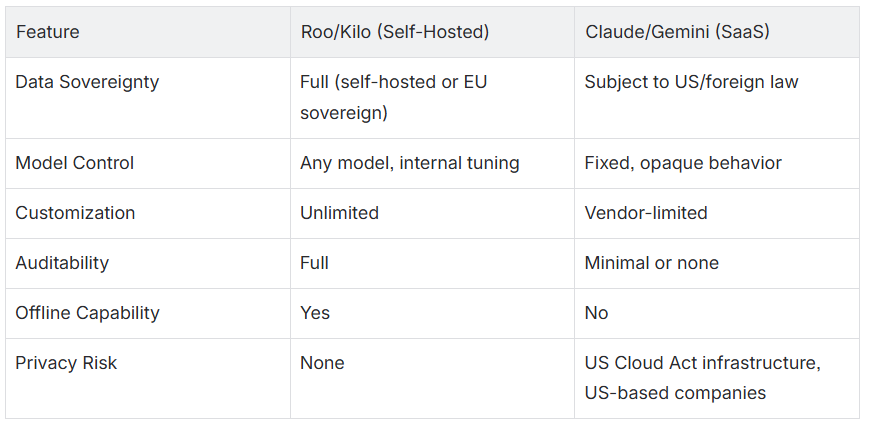
In conclusion, SaaS tools offer convenience, but they cannot offer full control or compliance guarantees required in critical or regulated domains.
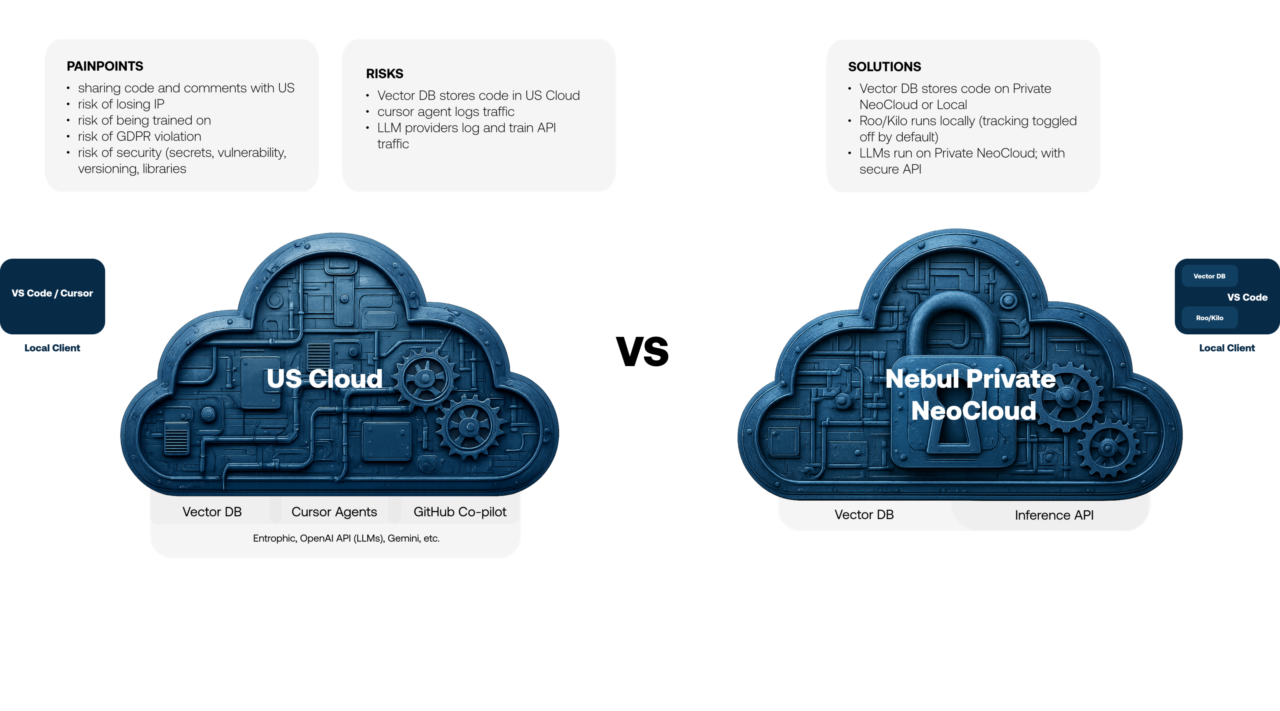
Summary
Roo and Kilo on VSCode, paired with a private inference API, shared QDrant indexing, Whoogle for secure search, and optionally hosted on Nebul’s sovereign NeoCloud, create a robust, secure, and extensible AI coding assistant. This setup offers:
- Full control over data and execution
- Complete alignment with European legal frameworks
- Compatibility with any model or internal API
- Custom modes and memory plugins for precise workflows
- Isolation from foreign jurisdictions and surveillance risks
This approach is ideal for teams working with sensitive IP, regulated codebases, or long-term infrastructure strategy. It replaces convenience with control.
Try it Yourself!
Ready to take control of your AI coding assistant? Book a free consultation call with us to explore how Roo and Kilo can help you build a sovereign, self-hosted, and customizable AI coding assistant that meets your organization’s specific needs.